
Batch delivery for music producers
Your session in.
Every deliverable out.
Boing turns your DAW session into a full, client-ready delivery — full mixes, instrumentals, acapellas, stems, and alternate versions — named to spec, peak-safe, in minutes. Not hours.
Runs on your machine. Your audio never leaves your computer.
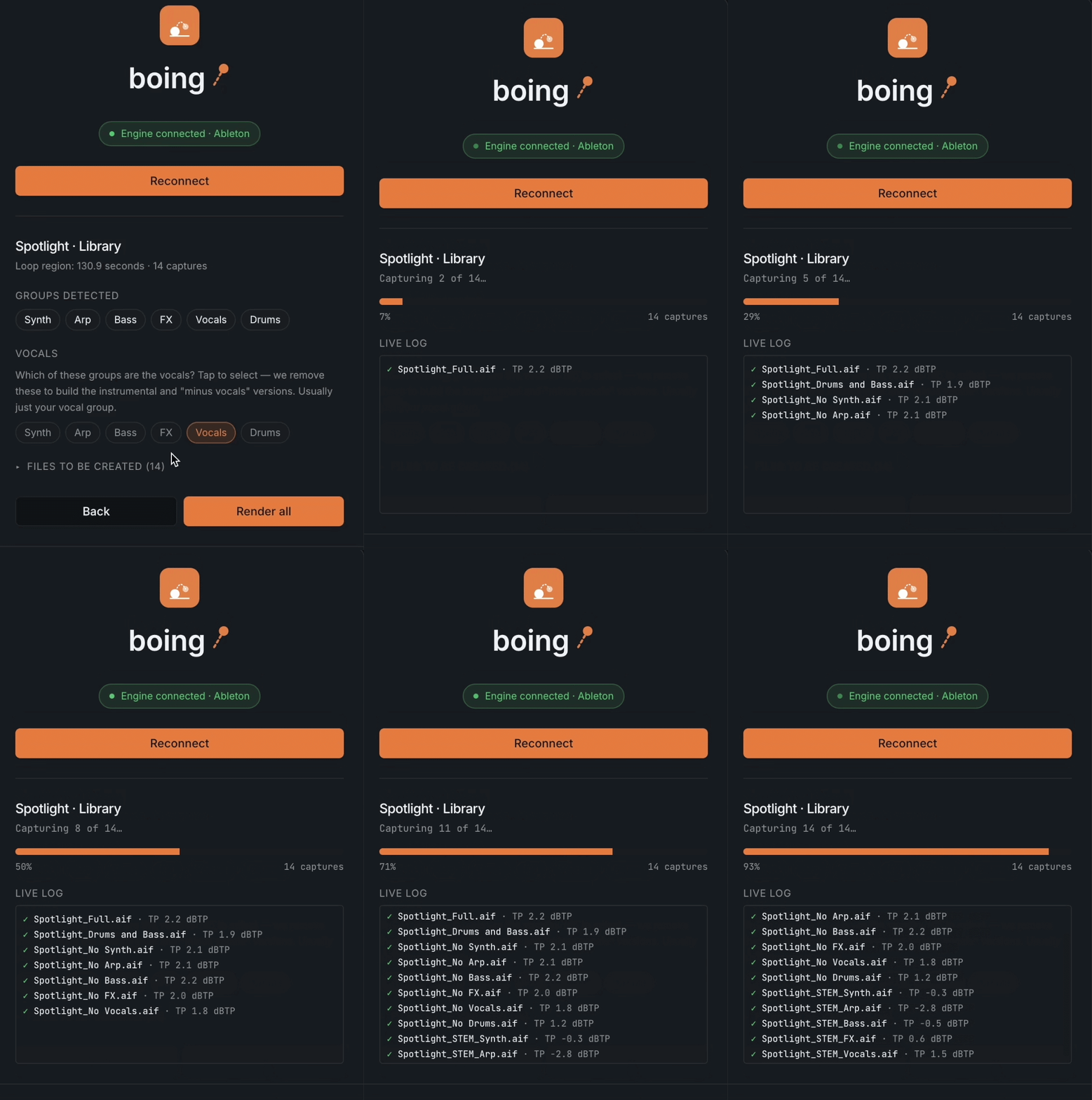
Delivery is the boring part.
Every release ends the same way — bouncing the full mix, then the instrumental, then the acapella, then a stack of stems and alt versions, renaming each one, checking levels, building a file list. It's an hour of careful, mind-numbing work for every song. Boing does all of it from one click.
Three clicks to a finished folder.
Connect
Open your project and connect Boing to your DAW.
Scan
Boing reads your session and shows you exactly what it'll deliver.
Render
Boing builds every deliverable, sets safe levels, names each file to your spec, and writes a manifest. Done.
Works in your DAW.
Boing speaks Logic Pro, Ableton Live, Pro Tools, and FL Studio. Connect your project and it's just Scan → Render.
Then in Boing
- 1Pick Logic and Connect.
- 2Choose your delivery spec, then Scan to confirm your groups.
- 3Click Render — Boing exports your tracks and assembles every deliverable.
Everything a delivery needs.
Every version
Full mix, instrumental, acapella, stems, “minus” versions, and custom subsets.
Delivery specs
Define a client's format once — files, sample rate, bit depth, naming, loudness — and reuse it on every song.
Named to spec
Every file comes out named exactly how the client wants it.
Peak-safe
Boing keeps mixes from clipping. Nothing distorts.
Manifest included
A clean CSV listing every file and what's in it.
Private by design
Boing runs locally. Your audio never leaves your machine.
Wet + dry
Post-mix stems keep your processing. Pre-mix tracks strip every effect for the raw source. Dry tracks are Ableton-only for now.
Whole albums
Point Boing at a folder and it renders every project in one run. Assisted or fully automatic.
Sheets included
Lyric sheets, track info, and PRO/IPI splits generated alongside the audio.
Deliver where your music lives.
Boing doesn't stop at a folder. Send finished packages straight to the platforms you already use — audio and metadata together, no manual upload.
SourceAudio
Push renders straight to your catalog.
Box
Deliver full packages to your own Box, ready to share.
Dropbox
Send finished deliveries to any Dropbox folder.
Harvest
Coming soonLog delivery time as you ship.
More on the way — need one? Tell us.
Available on Enterprise
Use Boing.
Start free, then scale from single tracks to albums and every integration.
Trial
No card required.
Three full deliveries on us. Everything works — this isn't a demo.
- 3 complete deliveries
- Every deliverable in the spec — full mix, instrumental, stems, all of it
- Named to your client's spec
- True-peak checked
- Track Info and Lyric sheets included
- Works in Ableton, Logic, FL Studio and Pro Tools
Your free deliveries are real ones. Render a track you're actually delivering and see whether the folder that comes out is one you'd send.
Basic
The render engine.
- Download & run the Boing app
- All built-in delivery specs
- Full mixes, instrumentals, acapellas, stems
- Peak-safe, correctly named files
- Track Info & Lyrics sheets, built into the delivery
- Single-song delivery
- Songwriter splits (PRO/IPI)
- Lyrics Sheets
Pro
Everything in Basic, plus album mode and custom specs.
- Everything in Basic
- Album mode — render a whole folder of projects in one run
- Assisted & Automatic modes
- Custom Client Specs — build & save your own presets per client
- Songwriter splits (PRO/IPI)
- Lyrics Sheets
- Lyric Draft — vocal-stem transcriber
Enterprise
Everything, plus every delivery integration and API access.
- Everything in Pro
- SourceAudio delivery
- Box delivery
- Dropbox, Harvest & future integrations
- API access
- Additional seats billed separately
- Lyric Draft — vocal-stem transcriber
Feature comparison
Find the right fit.
Basic
$29.99/mo
Core engine
- DAWs supported (Logic, Ableton, FL Studio, Pro Tools)
- Standard naming specs
- True-peak safety check
Advanced modes
- Single-song delivery
- Album mode (batch)—
- Custom client specs—
Metadata & assets
- Track Info & Lyric sheets
- Lyric Draft (vocal-stem transcriber)—
Integrations
- Local disk delivery
- SourceAudio, Box & Dropbox—
- API access—
Pro
$49.99/mo
Core engine
- DAWs supported (Logic, Ableton, FL Studio, Pro Tools)
- Standard naming specs
- True-peak safety check
Advanced modes
- Single-song delivery
- Album mode (batch)
- Custom client specs
Metadata & assets
- Track Info & Lyric sheets
- Lyric Draft (vocal-stem transcriber)
Integrations
- Local disk delivery
- SourceAudio, Box & Dropbox—
- API access—
Enterprise
Contact us
Core engine
- DAWs supported (Logic, Ableton, FL Studio, Pro Tools)
- Standard naming specs
- True-peak safety check
Advanced modes
- Single-song delivery
- Album mode (batch)
- Custom client specs
Metadata & assets
- Track Info & Lyric sheets
- Lyric Draft (vocal-stem transcriber)
Integrations
- Local disk delivery
- SourceAudio, Box & Dropbox
- API access
Boing vs the bounce tools
One delivery, not one bounce.
Other tools print files. Boing prints the folder you send to the client.
Boing
Logic, Ableton, FL, Pro Tools
Works in
- Ableton Live
- Logic Pro
- Pro Tools
- FL Studio
What comes out
- Group stems
- Instrumental & acapellaAutomatic
- Alternate mixes
- Cutdowns from markers
- Client naming templates
Checks & paperwork
- True-peak checked
- Loudness logged per file
- Delivery manifest
- Track info sheet
- Lyric sheet
- Songwriter splits
How it runs
- Keep working while it prints
- Whole album in one run
- MP3 export
- Dolby Atmos—
- Renders locally
Price
- Monthly$29.99Pro $49.99
- One-time licence—
- Try it free3 deliveriesNo card required
Forte FMusic
Pro Tools & Logic
Works in
- Ableton Live—
- Logic Pro
- Pro Tools
- FL Studio—
What comes out
- Group stems
- Instrumental & acapellaManualConfigure mute states
- Alternate mixes
- Cutdowns from markers—
- Client naming templates—
Checks & paperwork
- True-peak checked—
- Loudness logged per file—
- Delivery manifest—
- Track info sheet—
- Lyric sheet—
- Songwriter splits—
How it runs
- Keep working while it prints
- Whole album in one run
- MP3 export
- Dolby Atmos
- Renders locally
Price
- Monthly$10–$39Three tiers
- One-time licence—
- Try it freeFree tierLite, with Pro Tools
Bounce Factory
Pro Tools
Works in
- Ableton Live—
- Logic Pro—
- Pro Tools
- FL Studio—
What comes out
- Group stems
- Instrumental & acapellaManualConfigure mute states
- Alternate mixes
- Cutdowns from markers—
- Client naming templates
Checks & paperwork
- True-peak checked—
- Loudness logged per file—States no LUFS targeting
- Delivery manifest—
- Track info sheet—
- Lyric sheet—
- Songwriter splits—
How it runs
- Keep working while it prints
- Whole album in one run
- MP3 export
- Dolby Atmos—
- Renders locally
Price
- Monthly€18€109 / year
- One-time licence€499
- Try it free7 days
EasyBounce
Logic
Works in
- Ableton Live—
- Logic Pro
- Pro Tools—
- FL Studio—
What comes out
- Group stems
- Instrumental & acapellaManualConfigure mute states
- Alternate mixes
- Cutdowns from markersPartialOne marked range, not assembled to length
- Client naming templates
Checks & paperwork
- True-peak checked—
- Loudness logged per file—
- Delivery manifest—
- Track info sheet—
- Lyric sheet—
- Songwriter splits—
How it runs
- Keep working while it prints—
- Whole album in one run—
- MP3 export
- Dolby Atmos—
- Renders locally
Price
- Monthly€11
- One-time licence€99€149 for two Macs
- Try it free7 days
Auto-Bounce
Logic
Works in
- Ableton Live—
- Logic Pro
- Pro Tools—
- FL Studio—
What comes out
- Group stems
- Instrumental & acapellaManualConfigure mute states
- Alternate mixes
- Cutdowns from markers—
- Client naming templates
Checks & paperwork
- True-peak checked—
- Loudness logged per file—
- Delivery manifest—
- Track info sheet—
- Lyric sheet—
- Songwriter splits—
How it runs
- Keep working while it prints—
- Whole album in one run—
- MP3 export—
- Dolby Atmos—
- Renders locally
Price
- Monthly$14.99
- One-time licenceYesPrice on request
- Try it free—
Cancel or switch anytime from your account.
Questions.
About
Setup
- Open your project in Logic Pro.
- In Boing, choose Logic and click Connect.
- Say yes to the two macOS prompts: Accessibility permission (System Settings → Privacy & Security → Accessibility), and allowing Boing to control Logic Pro.